

Damian Harrop
Weapon Forge
Table of Contents
Overview
UI Art: Clip Studio Paint
Wireframe Software: Figma
Usability/Preference Testing: Maze & Google Forms
Engine: Unity
Dev Time: 1 Year
Weapon Forge is an application to help new Dungeons and Dragons players find a weapon to suit them, and to help seasoned players find new weapons or visualize their gear in their own aesthetic!
Introduction
When I first started developing this project in January 2020, I did not entirely know what I wanted to do. I had a few ideas that could have been developed further, but I struggled to find a project that could solve a problem. One of my proposals was a fantasy weapon customizer, as I am fond of fantasy games and like the idea of having custom weapons. Mainly I took inspiration from my love of fantasy games and a weapon model I made in a previous class, which was a battle axe that had gems and a nature theme around it, and wanted users to be able to make weapons like that one with a range of different weapons and materials.
To start my exploration and research, I turned to Dungeons and Dragons, an activity that I have been interested in, but never was able to get into due to the intimidating amount of information that new players need to learn. While I have made a few characters using DnD websites, it was not without the help of more experienced players who could give me pointers and help explain different stats and roles. I then found my problem that I wanted to fix, I wanted to help newer players be able to make weapons in an environment that is understandable and fun, where information can be explained in a more comprehensible way. I wanted to break down how materials can change stats of a weapon, as well as let users play with different materials to be creative in their weapon’s aesthetic. Thus, Weapon Forge was originally designed to be a tool that would be a weapon customizer, but then turned to be a tool that would help new DnD players find a weapon that fits their playstyle, as well as introduce them to weapons and materials, and also be a creative tool for more experienced players to help visualize the aesthetic of their weapons.


User Research
When beginning my process of research and development, I first needed to confirm that there truly was a problem that could be solved, as well as getting a better gauge on who the target audience for this project would be. I created a survey that broke respondents up based on if they played DnD) or not, and then asked unique questions to each group from there. 90% of testers said that they played this genre of game, and a strong majority out of those testers said they liked this genre because they liked creating characters, lore, teamwork & weapons. Furthermore, those who did play DnD were active players for a while. When beginning this project, almost 66% of the participants said they were moderate to seasoned vet players, and just over 20% of participants said they were beginners. This was important because my target demographic would need to change, I would have to take into consideration the people who play DnD, not just the beginners who don’t understand the game.
The respondents who did not play DnD were also very helpful in gathering information. Almost all respondents in this category claimed that they did not play because they did not know where to start, and some claimed that there was too much information to learn. This was important because I had to make sure that the project in development would be helpful and comprehensive for beginners and didn’t overload them with information.
Lastly, I asked respondents for their age so that I could have more details on who my target demographic would be. Nearly all respondents were over 18, with over 60% of them being in the category of 19-25, and over 25% being 26-35. This was also important because it helped make some personas to keep in mind while developing this project.
To read more about my user research, click here!
Competitive Analysis
When doing research on competitors on this market, I did not find a lot of competition. In the market of character customization, there was a broad amount, from pixel art to programs that actually could make custom miniatures for player’s campaign sessions. However, in the market of weapon customization, I could not find anything that was like my project. To me this was a fascinating bit of research because DnD has a large fanbase, and so many websites and books dedicated to lore and characters, that I figured there would be more programs and tools that would help player’s visualize their characters and weapons, but there was very little that I found that falls in that category.
The biggest competitor that I could find was Hero Forge, which is a website where users can make their own custom characters which can then be purchased as miniatures on the website if they so wish. This website has hundreds of customizations of different body parts and gear, so that the player can make whatever character they could possibly think of. However, it does not come in color, so the player would have to paint the miniature themselves and cannot customize the weapon that they want, they can only choose from a list in the program.
What I did notice, however, was the layout of the program. Hero Forge has the figure on one side of the screen, with all of the customization options on the other side. The main points were broken down into the margins of the customization side, where if the user clicked on the faces tab, it would show in the panel all of the different face options that the user could choose from. It was a good starting point for designing my project’s customization piece, and while I wanted to make it fit the projects aesthetic better, I still kept this layout in mind while I was developing.
What my project is developed to be is a program that customizes weapons, and while it does not have as many customization options that Hero Forge has, it does breakdown weapons to be more manageable to understand, and user’s can have different materials and change the aesthetic of their weapon as they choose. Overall, there are not a lot of programs on the market for DnD customizers, let alone weapon customizers. This is both good news for my project, as well as a challenge. Weapon Forge will be one of a kind on the market, but if it is it will have to be very good to serve its purpose and set the bar high for competitors.
Personas
After conducting my initial user feedback survey and gathering information on my target audience, I wanted to cover the broad range of users I received in my feedback, and look at what their needs and wants in this project could be. I focused more on the skill of the player, and how their everyday lives affect their ability to play DnD, and what they will need from a program in order to fit their needs and came up with these three personas:
- Maria (21 years old), a college student whose boyfriend talks a lot about DnD, but she herself does not understand the game and becomes overwhelmed when looking at resources online. She needs something that will help her learn the rules and understand different aspects of the game in a simple manner.
- Roger (28 years old), a programmer who plays DnD frequently, but has only used one type of character and play style, and would like to try out a new play style. He needs a tool that will help him find a weapon that will fit his new play style quickly as he is busy and can’t spend hours working on a weapon.
- Jason (20 years old), a college student who plays frequently, spending most of his weekends playing with friends and has tried a range of characters and play styles. He wants a program that will help him visualize weapons and aesthetics as he is not artistic and has trouble communicating his ideas.
To read more in depth of my personas, please click here!
Content Strategy Outline + Sitemap
During week 5, I took my user flow and broke it down into a content strategy guide, where I broke it down into the main components and what I planned to have in the project. When thinking about the main idea and organization of my project, I wanted to break it down into three main components:
- Quiz Section: Here the user will be in the shop and talking to the person at the counter, where they will be asked questions and have to answer in the full quiz or just answering what type of weapon they want if they don’t want to take the quiz. If the user takes the full quiz, they will be led to more dialogue with the person at the counter where their play style will be described to them in detail.
- Results Page: Based on the user’s play style, there will be a page where there are three weapons of that play style, where there will be a picture of the weapon, and a little description of the weapon and how it handles so that the player can choose the best one for them.
- Customization Page: Here the player will have the weapon that they chose on one side of the screen, and all of the different customizable parts on the other side. The customizable parts are then broken down into different materials that the player can choose from, and there will be descriptions of the material and what that material does.
During development, I broke down the layout of the different pages in the project, and laid them out as to how I would like them to be when they started to get implemented into wireframes. This was important because it broke everything down into the most basic of formatting, I wasn’t thinking about the shapes of things or what they would look like, just where I would put them on the screen, which really helped with organization.
To review my content strategy guide, please click here!
To view my sitemap, click here!
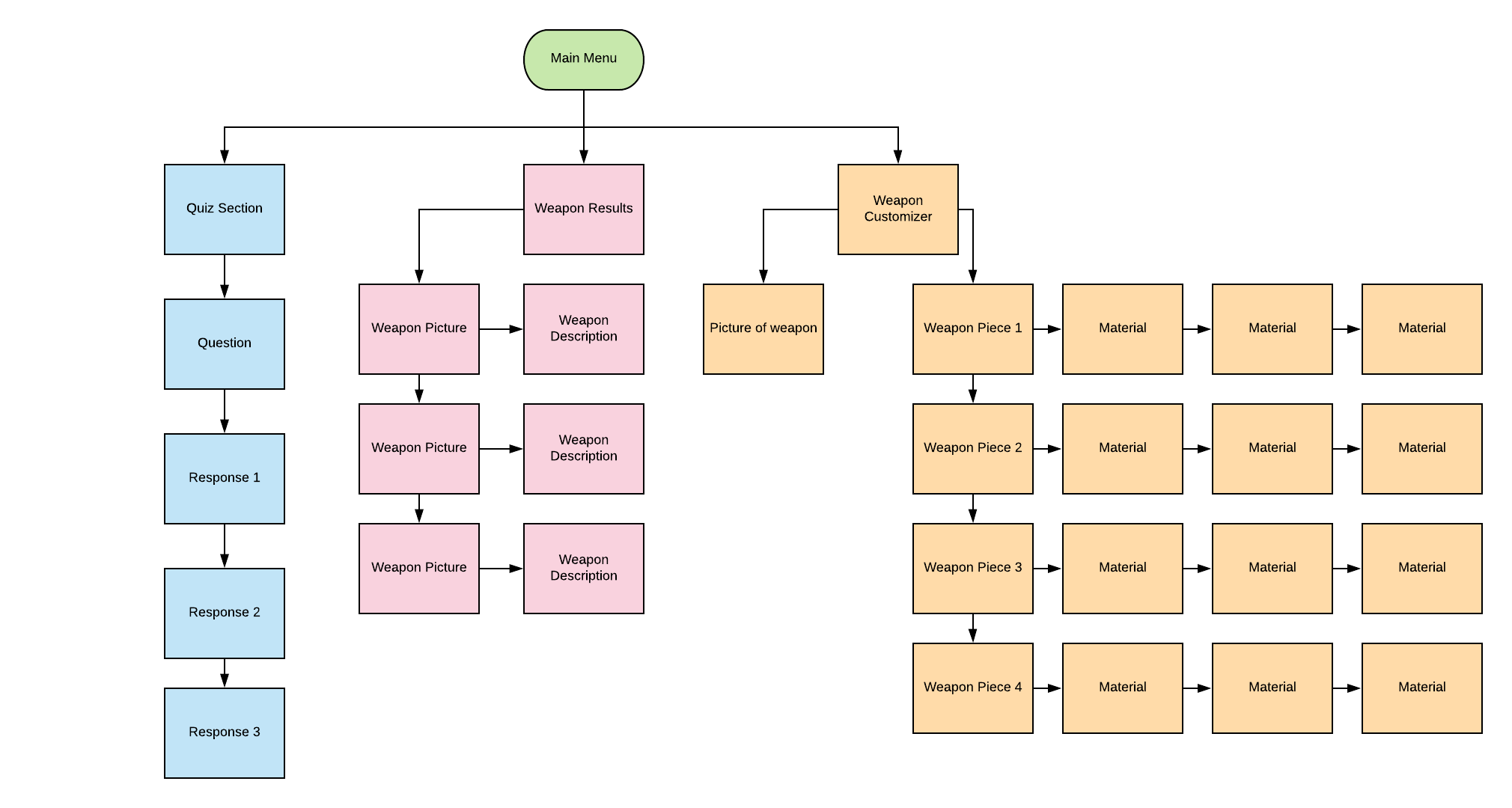
To view my user flow, click here!

Wireframe
Usability Testing
On week 6 of development, I was able to test my first iteration of wireframes with three of my friends and got some good responses, as well as needed to change some things about my project. The test took place in person using Maze, where I could put my Figma wireframes and make tasks for testers to find and complete in my project. Performance during this test was really well, besides the end where people were confused as to what they needed to do. It was also brought up during this time where one of my choices should not be in the program. I had curses that users could put on weapons, but it was pointed out that curses only hurt the owner of the weapon, so testers were confused as to why it would be an option.
To look at the full results document, click here!
During week 8 of development, I was able to test the second set of wireframes I made with four of my friends. There was a lot of feedback from the testers, all of which were frequent DnD players and all of which thought the project would be helpful to use as a visualizer. They also thought that it would be good to use if they wanted to change up their fighting style. From the testing, I saw that ¾ users clicked on the arrow in the dialogue box to progress, and testers struggled with understanding that the materials came from a catalog and the weapon was supposed to look like a sketch on paper, like the shop owner was sketching out what the weapon would look like.
To look at the full results document, click here!
Unfortunately, after these two tests, I was not able to perform anymore usability testing due to the coronavirus and time limitations, but from the two tests I performed early on, I was able to gather information that helped solidify my design moving forward, especially when it came to implementing art.
Branding
The most important part in this whole ordeal was the weapons themselves. I needed to find out what weapons I would need in order to make this project possible. I broke down weapons into close range, medium range, and long range weapons, and from different DnD sites I grabbed both basic weapons and more complicated ones to add variety. I then researched different materials that could be used and added different materials for the handle and the blades. Lastly, I came up with some ideas on what could be added to the aesthetic of the weapon to make them more interesting. I then made a survey and sent it out to get some feedback on what testers would like to see in the project. I was able to receive 8 responses from this preference test, and it gave some good feedback. From the feedback I saw that:
- Close range weapons: over half of respondents wanted daggers, scimitars, and battle hammers in the project
- Medium range weapons: 75% wanted a battle axe, 50% wanted a greatsword, and 37.5% wanted a longsword
- Long range weapons: 50% of responses wanted to see bows and scorpion whips, and 37.5% wanted to see crossbows in the program
- Handle materials: 50% wanted copper, 62.5% wanted steel, 87.5% wanted darkwood, and 100% wanted bone as materials
- Blade materials: 50% wanted mithral, 62.5% wanted steel, 87.5% wanted gold and 100% wanted obsidian as materials
- Accessories: 62.5% wanted fire damage, 75% wanted a plant theme, 87.5% wanted battle damage, and 100% wanted gems as accessories
To see the full results document, click here!
The overall aesthetic I had tried to replicate in this project is a fantasy world setting, one that is typically visualized in a medieval setting, as that is seen as the typical DnD fantasy aesthetic. I looked at references and noticed that there was a lot of neutral tones with browns and grays. I would then take that and put it into my color palette and have very muted and muddled colors, as much as I could.
Here is where I decided to mix both the top and the bottom images to get my color palette. I wanted my environment to look more like being a shop in a small city rather than a caravan on the side of the road, so I wanted more colors and make things look more lively.
However, when it came to testing, there was conflict with what I thought looked best, and what the majority of the other testers wanted when it came to the aesthetics and lighting of the scene. During week 9 of development, I sent out a preference test via social media like Discord and Facebook, and encouraged some of my friends to send them as well. The survey revolved around preference testing with colors of my environment, being the lighting and the flags around the environment. The testers were able to choose combinations from green, blue and pink flags as well as orange, blue and white light. I was able to get 17 responses by the time I closed responses, and the results surprised me a little. I believed that green flags and orange light would be a preferred look amongst testers, but that was not the case at all. Almost 60% of testers preferred blue flags, and out of those responses, 50% preferred the orange light. That being said, I made the color adjustments and was able to make my environment the way that the majority of testers wanted it.
To see the full testing results document, click here!
As development continued, I wanted to preference test typography, as well as get some feedback on the shopkeeper asset that I had made. My goal of the test was to have people find a font that would work best for buttons, and one that would work best for dialogue, as well as make any changes to the shopkeeper if need be. I was able to find five fonts that had a fantasy aesthetic to them, and made examples of buttons and dialogue out of each font and sent out a survey online to get responses. I was able to acquire 25 responses, where 52% of testers found that font Dreamland was the best for the buttons, and font Dalelands was best for the dialogue. Additionally, the majority of testers took a liking to the shopkeeper asset, and said that he fits in with their idea of fantasy aesthetic and that he fits into the environment.
Conclusion
Overall, I learned a lot about the subject matter during this project. Going into the project, it was shocking to see how little tools there are in order to help people customize their weapons or even their characters. That can be intimidating when it comes to newer players who are greeted with walls of text on websites that aren’t good at giving the basics. Furthermore, a lot of my users moving forward will be people who already play DnD, rather than what I originally thought was going to be a target audience of new players. I am happy that I changed my design to accommodate people who already play DnD rather than keeping it to just new players, because there will be more interaction with the product and help more people down the line with visualizing their weapons.
Lastly, while I was able to make a prototype for the class, I was not able to polish it and make it work as much as I wanted it to, and that it required a lot more programming skill than I currently have. Over the summer, I would like to, and plan to, continue working on this project so that I can have a fully developed product to show on my portfolio. I wish I was a little more on top of my planning, but after COVID-19 causing disturbances in school, it made it very hard to bounce back as I missed a crucial week in my planning. However, I can only move forward from here, and am excited to continue to work on this project.
Prototypes
First Prototype:
In my first prototype, I did not have any art, nor did I format it entirely well for what I wanted it to be. It had the blue generic background from the unity engine, and did not have a prototype of the customization set up either. It was mainly to set up that the quiz section would work, and send the user to the correct place, and it worked for what it was. Additionally, I made my first pass on buttons for the game, which I would change in the next iteration.
Second Prototype:
In my second iteration of the prototype, I was able to make all the backgrounds for the prototype, as well as be able to put in the fonts from the preference testing. Unfortunately, due to time limitations, and programming skills, customization was not able to be fully implemented, and is a very bare bones prototype that will be developed later.


Overview
UI Art: Clip Studio Paint
Wireframe Software: Figma
Usability/Preference Testing: Maze & Google Forms
Engine: Unity
Dev Time: 1 Year
Weapon Forge is an application to help new Dungeons and Dragons players find a weapon to suit them, and to help seasoned players find new weapons or visualize their gear in their own aesthetic!
Introduction
When I first started developing this project in January 2020, I did not entirely know what I wanted to do. I had a few ideas that could have been developed further, but I struggled to find a project that could solve a problem. One of my proposals was a fantasy weapon customizer, as I am fond of fantasy games and like the idea of having custom weapons. Mainly I took inspiration from my love of fantasy games and a weapon model I made in a previous class, which was a battle axe that had gems and a nature theme around it, and wanted users to be able to make weapons like that one with a range of different weapons and materials.
To start my exploration and research, I turned to Dungeons and Dragons, an activity that I have been interested in, but never was able to get into due to the intimidating amount of information that new players need to learn. While I have made a few characters using DnD websites, it was not without the help of more experienced players who could give me pointers and help explain different stats and roles. I then found my problem that I wanted to fix, I wanted to help newer players be able to make weapons in an environment that is understandable and fun, where information can be explained in a more comprehensible way. I wanted to break down how materials can change stats of a weapon, as well as let users play with different materials to be creative in their weapon’s aesthetic. Thus, Weapon Forge was originally designed to be a tool that would be a weapon customizer, but then turned to be a tool that would help new DnD players find a weapon that fits their playstyle, as well as introduce them to weapons and materials, and also be a creative tool for more experienced players to help visualize the aesthetic of their weapons.
User Research
When beginning my process of research and development, I first needed to confirm that there truly was a problem that could be solved, as well as getting a better gauge on who the target audience for this project would be. I created a survey that broke respondents up based on if they played DnD) or not, and then asked unique questions to each group from there. 90% of testers said that they played this genre of game, and a strong majority out of those testers said they liked this genre because they liked creating characters, lore, teamwork & weapons. Furthermore, those who did play DnD were active players for a while. When beginning this project, almost 66% of the participants said they were moderate to seasoned vet players, and just over 20% of participants said they were beginners. This was important because my target demographic would need to change, I would have to take into consideration the people who play DnD, not just the beginners who don’t understand the game.
The respondents who did not play DnD were also very helpful in gathering information. Almost all respondents in this category claimed that they did not play because they did not know where to start, and some claimed that there was too much information to learn. This was important because I had to make sure that the project in development would be helpful and comprehensive for beginners and didn’t overload them with information.
Lastly, I asked respondents for their age so that I could have more details on who my target demographic would be. Nearly all respondents were over 18, with over 60% of them being in the category of 19-25, and over 25% being 26-35. This was also important because it helped make some personas to keep in mind while developing this project.
To read more about my user research, click here!
Competitive Analysis
When doing research on competitors on this market, I did not find a lot of competition. In the market of character customization, there was a broad amount, from pixel art to programs that actually could make custom miniatures for player’s campaign sessions. However, in the market of weapon customization, I could not find anything that was like my project. To me this was a fascinating bit of research because DnD has a large fanbase, and so many websites and books dedicated to lore and characters, that I figured there would be more programs and tools that would help player’s visualize their characters and weapons, but there was very little that I found that falls in that category.
The biggest competitor that I could find was Hero Forge, which is a website where users can make their own custom characters which can then be purchased as miniatures on the website if they so wish. This website has hundreds of customizations of different body parts and gear, so that the player can make whatever character they could possibly think of. However, it does not come in color, so the player would have to paint the miniature themselves and cannot customize the weapon that they want, they can only choose from a list in the program.
What I did notice, however, was the layout of the program. Hero Forge has the figure on one side of the screen, with all of the customization options on the other side. The main points were broken down into the margins of the customization side, where if the user clicked on the faces tab, it would show in the panel all of the different face options that the user could choose from. It was a good starting point for designing my project’s customization piece, and while I wanted to make it fit the projects aesthetic better, I still kept this layout in mind while I was developing.
What my project is developed to be is a program that customizes weapons, and while it does not have as many customization options that Hero Forge has, it does breakdown weapons to be more manageable to understand, and user’s can have different materials and change the aesthetic of their weapon as they choose. Overall, there are not a lot of programs on the market for DnD customizers, let alone weapon customizers. This is both good news for my project, as well as a challenge. Weapon Forge will be one of a kind on the market, but if it is it will have to be very good to serve its purpose and set the bar high for competitors.
Personas
After conducting my initial user feedback survey and gathering information on my target audience, I wanted to cover the broad range of users I received in my feedback, and look at what their needs and wants in this project could be. I focused more on the skill of the player, and how their everyday lives affect their ability to play DnD, and what they will need from a program in order to fit their needs and came up with these three personas:
- Maria (21 years old), a college student whose boyfriend talks a lot about DnD, but she herself does not understand the game and becomes overwhelmed when looking at resources online. She needs something that will help her learn the rules and understand different aspects of the game in a simple manner.
- Roger (28 years old), a programmer who plays DnD frequently, but has only used one type of character and play style, and would like to try out a new play style. He needs a tool that will help him find a weapon that will fit his new play style quickly as he is busy and can’t spend hours working on a weapon.
- Jason (20 years old), a college student who plays frequently, spending most of his weekends playing with friends and has tried a range of characters and play styles. He wants a program that will help him visualize weapons and aesthetics as he is not artistic and has trouble communicating his ideas.
To read more in depth of my personas, please click here!
Content Strategy Outline + Sitemap
During week 5, I took my user flow and broke it down into a content strategy guide, where I broke it down into the main components and what I planned to have in the project. When thinking about the main idea and organization of my project, I wanted to break it down into three main components:
- Quiz Section: Here the user will be in the shop and talking to the person at the counter, where they will be asked questions and have to answer in the full quiz or just answering what type of weapon they want if they don’t want to take the quiz. If the user takes the full quiz, they will be led to more dialogue with the person at the counter where their play style will be described to them in detail.
- Results Page: Based on the user’s play style, there will be a page where there are three weapons of that play style, where there will be a picture of the weapon, and a little description of the weapon and how it handles so that the player can choose the best one for them.
- Customization Page: Here the player will have the weapon that they chose on one side of the screen, and all of the different customizable parts on the other side. The customizable parts are then broken down into different materials that the player can choose from, and there will be descriptions of the material and what that material does.
During development, I broke down the layout of the different pages in the project, and laid them out as to how I would like them to be when they started to get implemented into wireframes. This was important because it broke everything down into the most basic of formatting, I wasn’t thinking about the shapes of things or what they would look like, just where I would put them on the screen, which really helped with organization.
To review my content strategy guide, please click here!
To view my sitemap, click here!
To view my user flow, click here!
Wireframe
Usability Testing
On week 6 of development, I was able to test my first iteration of wireframes with three of my friends and got some good responses, as well as needed to change some things about my project. The test took place in person using Maze, where I could put my Figma wireframes and make tasks for testers to find and complete in my project. Performance during this test was really well, besides the end where people were confused as to what they needed to do. It was also brought up during this time where one of my choices should not be in the program. I had curses that users could put on weapons, but it was pointed out that curses only hurt the owner of the weapon, so testers were confused as to why it would be an option.
To look at the full results document, click here!
During week 8 of development, I was able to test the second set of wireframes I made with four of my friends. There was a lot of feedback from the testers, all of which were frequent DnD players and all of which thought the project would be helpful to use as a visualizer. They also thought that it would be good to use if they wanted to change up their fighting style. From the testing, I saw that ¾ users clicked on the arrow in the dialogue box to progress, and testers struggled with understanding that the materials came from a catalog and the weapon was supposed to look like a sketch on paper, like the shop owner was sketching out what the weapon would look like.
To look at the full results document, click here!
Unfortunately, after these two tests, I was not able to perform anymore usability testing due to the coronavirus and time limitations, but from the two tests I performed early on, I was able to gather information that helped solidify my design moving forward, especially when it came to implementing art.
Branding
The most important part in this whole ordeal was the weapons themselves. I needed to find out what weapons I would need in order to make this project possible. I broke down weapons into close range, medium range, and long range weapons, and from different DnD sites I grabbed both basic weapons and more complicated ones to add variety. I then researched different materials that could be used and added different materials for the handle and the blades. Lastly, I came up with some ideas on what could be added to the aesthetic of the weapon to make them more interesting. I then made a survey and sent it out to get some feedback on what testers would like to see in the project. I was able to receive 8 responses from this preference test, and it gave some good feedback. From the feedback I saw that:
- Close range weapons: over half of respondents wanted daggers, scimitars, and battle hammers in the project
- Medium range weapons: 75% wanted a battle axe, 50% wanted a greatsword, and 37.5% wanted a longsword
- Long range weapons: 50% of responses wanted to see bows and scorpion whips, and 37.5% wanted to see crossbows in the program
- Handle materials: 50% wanted copper, 62.5% wanted steel, 87.5% wanted darkwood, and 100% wanted bone as materials
- Blade materials: 50% wanted mithral, 62.5% wanted steel, 87.5% wanted gold and 100% wanted obsidian as materials
- Accessories: 62.5% wanted fire damage, 75% wanted a plant theme, 87.5% wanted battle damage, and 100% wanted gems as accessories
To see the full results document, click here!
The overall aesthetic I had tried to replicate in this project is a fantasy world setting, one that is typically visualized in a medieval setting, as that is seen as the typical DnD fantasy aesthetic. I looked at references and noticed that there was a lot of neutral tones with browns and grays. I would then take that and put it into my color palette and have very muted and muddled colors, as much as I could.
Here is where I decided to mix both the top and the bottom images to get my color palette. I wanted my environment to look more like being a shop in a small city rather than a caravan on the side of the road, so I wanted more colors and make things look more lively.
However, when it came to testing, there was conflict with what I thought looked best, and what the majority of the other testers wanted when it came to the aesthetics and lighting of the scene. During week 9 of development, I sent out a preference test via social media like Discord and Facebook, and encouraged some of my friends to send them as well. The survey revolved around preference testing with colors of my environment, being the lighting and the flags around the environment. The testers were able to choose combinations from green, blue and pink flags as well as orange, blue and white light. I was able to get 17 responses by the time I closed responses, and the results surprised me a little. I believed that green flags and orange light would be a preferred look amongst testers, but that was not the case at all. Almost 60% of testers preferred blue flags, and out of those responses, 50% preferred the orange light. That being said, I made the color adjustments and was able to make my environment the way that the majority of testers wanted it.
To see the full testing results document, click here!
As development continued, I wanted to preference test typography, as well as get some feedback on the shopkeeper asset that I had made. My goal of the test was to have people find a font that would work best for buttons, and one that would work best for dialogue, as well as make any changes to the shopkeeper if need be. I was able to find five fonts that had a fantasy aesthetic to them, and made examples of buttons and dialogue out of each font and sent out a survey online to get responses. I was able to acquire 25 responses, where 52% of testers found that font Dreamland was the best for the buttons, and font Dalelands was best for the dialogue. Additionally, the majority of testers took a liking to the shopkeeper asset, and said that he fits in with their idea of fantasy aesthetic and that he fits into the environment.
Conclusion
Overall, I learned a lot about the subject matter during this project. Going into the project, it was shocking to see how little tools there are in order to help people customize their weapons or even their characters. That can be intimidating when it comes to newer players who are greeted with walls of text on websites that aren’t good at giving the basics. Furthermore, a lot of my users moving forward will be people who already play DnD, rather than what I originally thought was going to be a target audience of new players. I am happy that I changed my design to accommodate people who already play DnD rather than keeping it to just new players, because there will be more interaction with the product and help more people down the line with visualizing their weapons.
Lastly, while I was able to make a prototype for the class, I was not able to polish it and make it work as much as I wanted it to, and that it required a lot more programming skill than I currently have. Over the summer, I would like to, and plan to, continue working on this project so that I can have a fully developed product to show on my portfolio. I wish I was a little more on top of my planning, but after COVID-19 causing disturbances in school, it made it very hard to bounce back as I missed a crucial week in my planning. However, I can only move forward from here, and am excited to continue to work on this project.
Prototypes
First Prototype:
In my first prototype, I did not have any art, nor did I format it entirely well for what I wanted it to be. It had the blue generic background from the unity engine, and did not have a prototype of the customization set up either. It was mainly to set up that the quiz section would work, and send the user to the correct place, and it worked for what it was. Additionally, I made my first pass on buttons for the game, which I would change in the next iteration.
Second Prototype:
In my second iteration of the prototype, I was able to make all the backgrounds for the prototype, as well as be able to put in the fonts from the preference testing. Unfortunately, due to time limitations, and programming skills, customization was not able to be fully implemented, and is a very bare bones prototype that will be developed later.